
Download Vector Artist APK – Vector Graphics Editor, Android App, Free Design Tool
Overview
Vector Artist is a mobile vector graphics editor developed by Marjupi Apps, designed for users who want to create professional-quality artwork directly on their Android devices. The app enables users to craft intricate designs using precise shapes and customizable curves, making it ideal for graphic designers, illustrators, and hobbyists seeking a portable creative solution. It supports the creation of scalable vector graphics, ensuring that artwork remains crisp and clear at any zoom level.
The software is particularly well-suited for designing icons, logos, illustrations, and other digital assets that require precision and high visual fidelity. With support for importing and editing SVG files, Vector Artist offers a level of flexibility that extends beyond basic drawing tools. It allows users to export their work to various platforms, including the device gallery, email, Dropbox, and Tumblr, enhancing workflow integration.
The app is available as a free download and is compatible with Android 5.0 and later versions. Its release on May 1, 2024, marks a recent update to an already feature-rich platform, indicating ongoing developer support.
Key Features & Capabilities
- Vector-Based Drawing – Create scalable artwork using shapes and Bezier curves, ensuring high-resolution output regardless of zoom level.
- SVG Import & Editing – Load and modify existing SVG graphics, enabling seamless integration with other design workflows.
- Gradient and Transparency Effects – Apply linear and radial gradients, along with transparency settings, to enhance visual depth and realism.
- Multi-Platform Export – Share finished designs via email, Dropbox, Tumblr, or save directly to the device gallery.
- High Zoom Precision – Zoom in without loss of clarity, allowing for detailed work on complex vector elements.
These features support a wide range of real-world applications, such as designing app icons, creating social media graphics, or producing scalable illustrations for print and web. The ability to edit SVG files makes it useful for users who need to adapt existing assets. The combination of shape tools, curve manipulation, and advanced visual effects empowers users to produce polished, professional results on mobile devices. While specific performance benchmarks were not provided, the app’s vector engine suggests efficient rendering and responsiveness during active design sessions. The inclusion of export options ensures that the workflow remains flexible and accessible across platforms.
User Interface, Workflow & Performance
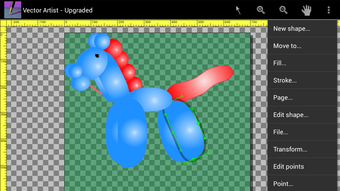
Vector Artist features a clean, intuitive interface tailored for touch-based interaction on Android devices. The layout organizes essential tools within easy reach, including shape generators, curve controls, and effect panels. Navigation is streamlined through a tabbed or layered interface, allowing users to switch between drawing modes, layers, and export settings with minimal friction.
The workflow is designed to support both beginners and experienced users, offering straightforward access to core functions while maintaining the depth required for advanced projects. The app’s responsiveness appears consistent with typical vector editing software on mobile platforms, though exact performance data such as CPU or RAM usage were not specified. Stability during prolonged use has not been independently verified, but the app’s compatibility with Android 5.0 and above suggests broad device support.
The developer did not provide additional system requirements, so users should rely on general Android performance guidelines. Overall, the interface prioritizes usability, making it accessible for on-the-go creative work.
Compatibility & System Requirements
Vector Artist is designed to run on Android 5.0 and later versions, ensuring accessibility across a wide range of devices, from older smartphones to newer tablets. The app has a file size of 32.1 MB, indicating a lightweight footprint that minimizes storage impact. While the developer did not specify exact hardware requirements, the app’s compatibility with Android 5.0 suggests it is optimized for devices with moderate processing power and memory.
No additional system specifications were listed, so users should consider standard Android device capabilities when installing. The app is distributed as an APK file, allowing direct installation outside of official app stores. This method may require enabling unknown sources in device settings.
The app’s architecture supports vector rendering, which typically demands efficient GPU utilization, but no details were provided regarding graphics processing demands. Users are advised to test the app on their specific device to ensure optimal performance.
Pros and Cons
Pros
- Free to download and use with no hidden costs
- Supports scalable vector graphics with no quality loss at high zoom levels
- Full SVG import and editing capabilities for existing designs
- Intuitive touch-friendly interface suitable for mobile use
- Offers advanced visual effects like gradients and transparency
- Multiple export options for sharing and integration with other platforms
Cons
- Exact performance metrics such as CPU or RAM usage were not provided
- Limited information on hardware requirements beyond Android 5.0
- No official integration with cloud design platforms or collaboration tools
- APK distribution may require manual installation and extra device permissions
- Advanced features may have a learning curve for complete beginners
FAQ Section
Is Vector Artist available for free?
Yes, Vector Artist is available as a free app for Android devices. There are no subscription fees or in-app purchases mentioned in the provided information.
Can I edit SVG files in Vector Artist?
Yes, the app supports importing and editing SVG graphics, allowing users to modify existing vector designs directly on their mobile device.
What operating systems does Vector Artist support?
Vector Artist is compatible with Android 5.0 and later versions. It is designed for mobile devices running the Android OS.
Is the app safe to download and install?
As a free app developed by Marjupi Apps, Vector Artist is distributed via APK. Users should ensure they download from trusted sources and verify the app’s authenticity before installation.
Can I use Vector Artist offline?
Yes, once installed, Vector Artist can be used without an internet connection. All design and editing functions operate locally on the device.
Final Thoughts
Vector Artist stands out as a powerful and accessible vector graphics editor for Android users seeking professional-grade design capabilities on mobile. Its support for scalable vector creation, SVG editing, and advanced visual effects makes it a compelling choice for designers who need portability and precision. The app’s free model, combined with a lightweight footprint and broad compatibility, enhances its appeal across a diverse user base.
While detailed performance data and hardware requirements are not available, the app’s functionality aligns with the expectations of a modern vector tool. It is particularly beneficial for illustrators, app developers, and content creators who require on-the-go design flexibility. With its intuitive interface and robust feature set, Vector Artist delivers strong value for its category.
Download Vector Artist now.






.png)
